Reporting-first
Offline receipt scanning with reports accounting can actually use.
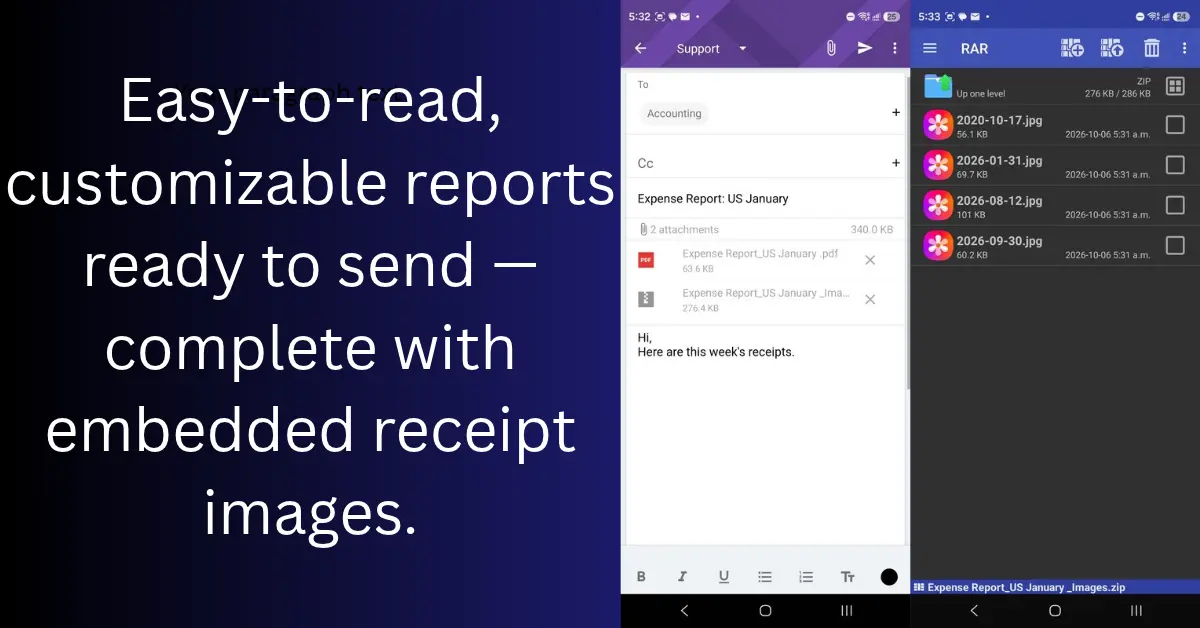
Capture without signal. Review on-device. Share a PDF summary, CSV spreadsheet, or ZIP of cropped receipt images when your fiscal period is ready—not a camera roll dump.
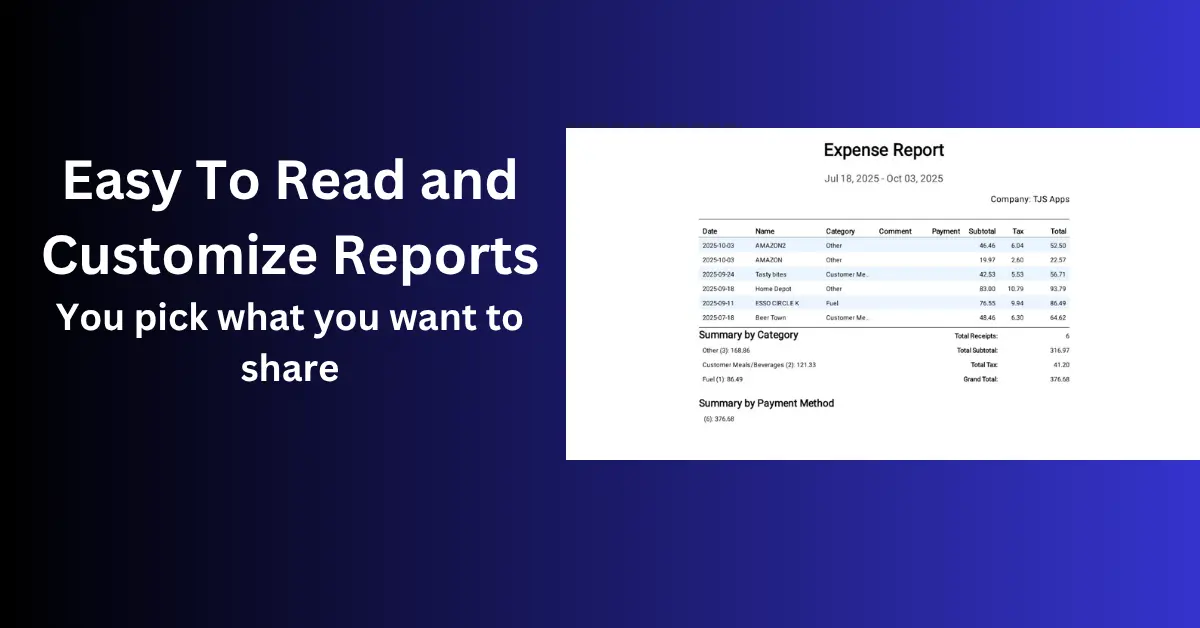
- PDF period report — vendor, tax, totals, comments in one file
- CSV export — rows for Excel or import into accounting software
- ZIP of cropped images — custom filenames (card + date)
- Archive before receipts fade — thermal paper won't wait
How offline receipt reporting fits a working day
Receipt work rarely happens at a desk with perfect service. You may be in a vehicle after a customer visit, at a job site, in a basement, or travelling between appointments. An offline receipt scanner lets you capture the receipt while it is still readable, review the details on your phone, and put it in the right fiscal period without waiting for a connection.
The point is not to make every receipt workflow identical. It is to make the important steps repeatable: capture the record, check the vendor and totals, add the information that matters to you, and keep it where you can retrieve it later. When the period is ready, the report is built from organised records instead of a camera roll full of unrelated photos.
Send the format the recipient can actually use
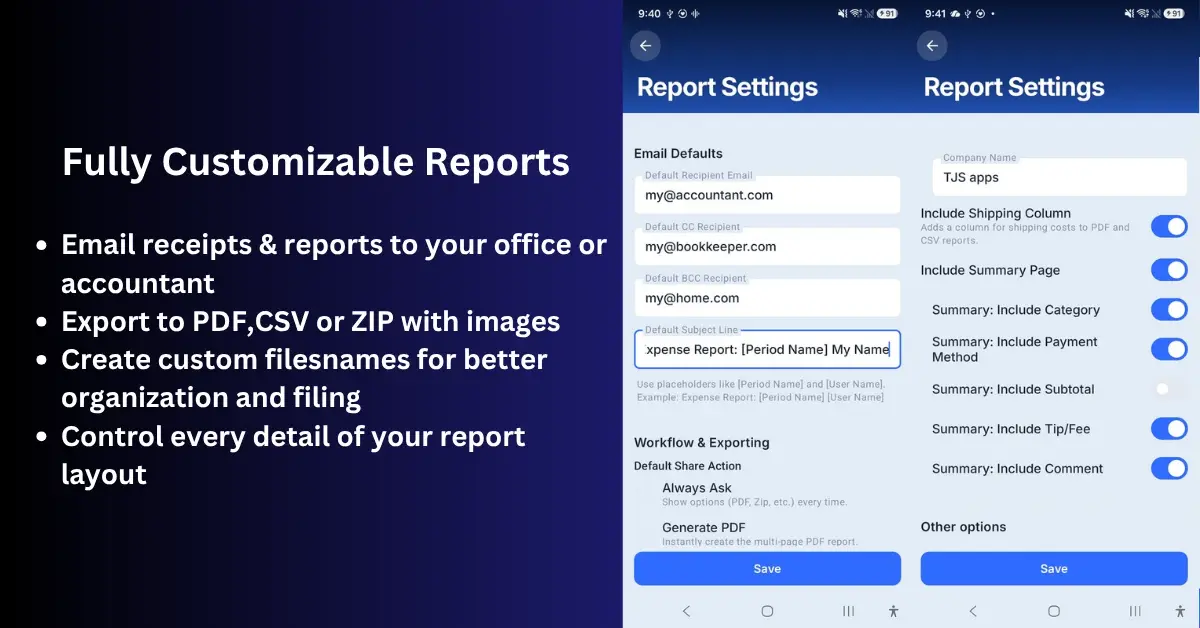
Different recipients need different report formats. A manager may want a PDF that is easy to read and attach to an expense claim. A bookkeeper may prefer a CSV file for Excel or another accounting workflow. Someone checking supporting documents may need receipt images alongside the summary. Scan Pro Receipts keeps those choices in the same reporting workflow rather than forcing every recipient into one format.
- PDF summaries for a clear, readable expense package.
- CSV exports when the data needs to be sorted or reviewed in a spreadsheet.
- ZIP image exports when the recipient needs the cropped receipt files themselves.
- Custom report structure when a summary, receipt pages, or both are required.
For a focused request, Category Expense Reports can find receipts by date range and category, show the included total, and let you review the selection before you choose a format and share it.
Keep personal records before paper receipts fade
Business reporting is only one reason to keep receipt records. Thermal-paper ink can fade, paper can tear, and a receipt needed for a warranty, repair, medical expense, vehicle service, utility bill, or household purchase can be difficult to find months later. A clear digital copy gives you something useful to retrieve after the original paper has faded or gone missing.
Scan Pro Receipts supports user-controlled receipt storage and backup locations. That means you can build a routine that fits the way you already keep files, instead of making a subscription cloud account the centre of your records. You are still responsible for maintaining the backup you choose, but the records remain under your control.
Designed for practical handoff, not enterprise complexity
This workflow is useful for contractors, consultants, territory sales staff, drivers, small business owners, and anyone preparing routine expense submissions. It is also useful for personal record keeping when a stack of receipts needs a clearer home. See the territory sales expense reporting overview for a field-to-office example.
Scan Pro Receipts does not claim to replace accounting software, provide tax advice, or offer a shared enterprise approval system. It provides a private, single-device receipt workflow: capture, review, organise, export, and share the records you need. For a deeper walkthrough, read the guide to offline receipt scanner reports.
60-day full trial · $29.99 lifetime · Works offline
Read the full guide: Best offline receipt scanner app for reports