Windows companion app
Capture on your phone. Finish on your PC.
Scan Pro Desktop Companion is a free Windows workstation for the Scan Pro mobile app. Import phone archives, review and bulk-edit receipts on a large screen, then push your corrections back to Android.
- Import phone archives — bring Scan Pro ZIP backups onto your PC
- Review on a big screen — full keyboard, fast search, and filter presets
- Round-trip edits — export a phone archive and update matching receipts on mobile
- Your data stays local — SQLite library in a folder you choose; no account for core use
- Tax-time category totals — filter medical, utilities, fuel, or any category by year or period and see the total instantly
Windows 10/11 · x64 · ~4.3 MB installer

What the desktop companion does
The phone is the best place to snap a receipt. The PC is the best place to finish the paperwork. Scan Pro Desktop Companion gives you a local workspace for reviewing, editing, organising, and exporting the receipts you captured on Android.
- Import phone archive ZIPs or desktop PDF/image files into a local SQLite library.
- Filter by period, category, year, and search across vendor, comment, payment, and amount fields.
- Bulk edit category, period, and reimbursable flags with a full keyboard.
- Export CSV for spreadsheets, print a receipt packet, or create phone-compatible archives.
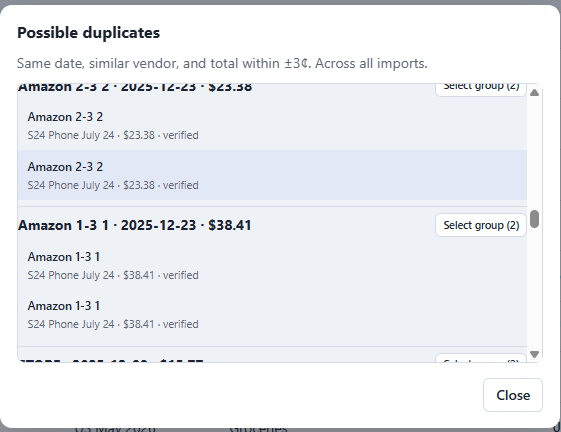
- Find duplicates before you hand records to an accountant or file them for tax time.
Benefits for tax time and record keeping
When tax season arrives, scattered receipts are hard to total and easy to lose. The desktop companion turns your phone captures into organised records on your PC, with tools that make category totals, batch cleanup, and archiving straightforward.
- Category totals in seconds — filter medical, dental, utilities, fuel, or any category across a year or custom period and see the total instantly.
- Batch receipt handling — select and update many receipts at once for category, period, or reimbursable flags, instead of editing one-by-one on a phone.
- Archive to external storage — keep your library and vault files on a local drive, NAS, or cloud-synced folder you control.
- Powerful filters and search — narrow by vendor, amount, comment, payment method, date, or period to find the exact records you need.
- Export or print reports — send category breakdowns and receipt packets to CSV, print a hard-copy packet, or save a desktop vault for backup.
Round-trip workflow with your phone
The desktop app does not replace the phone app. It extends it. Data moves through archives you control — by USB, shared folder, or NAS — with no cloud account required for day-to-day use.
- On the phone, go to Backup & restore and export a phone archive ZIP.
- Open Scan Pro Desktop Companion and import that archive.
- Review, filter, edit, and organise receipts on the PC.
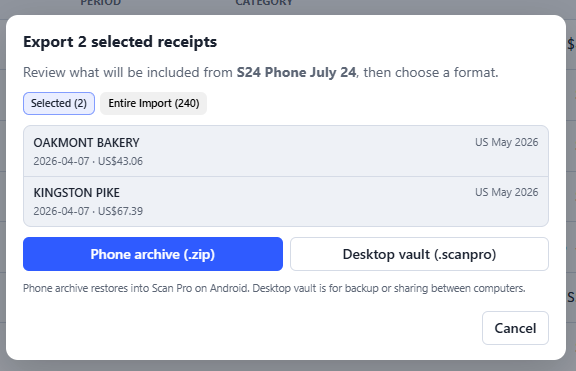
- Export a phone archive for the receipts you changed.
- On the phone, import the archive with Update matching receipts so edits overwrite the same records.


Export choices for different jobs
Not every handoff needs the same format. The desktop companion can send the right file to the right place: CSV for a spreadsheet, a printed/PDF packet for an expense claim, a desktop vault for PC backup, or a phone archive to keep mobile in sync.
Catch duplicates and errors before tax time
Duplicate receipts and mistyped totals are easy to miss on a small screen. The desktop app surfaces possible duplicates across all imports so you can review them side by side and fix the records before they reach a spreadsheet or tax summary.
Private by design, offline by default
Your receipt library lives in a folder on your computer that you choose. There is no mandatory cloud account for core use, no ads, and no external AI processing your documents. You can keep the database and receipt files on a local drive, a NAS, or inside your own cloud-synced folder.
Scan Pro Desktop Companion is a free companion to the Scan Pro Android app. It is intended for personal and small-business receipt workflows, not as a replacement for accounting software or tax advice.
Installation
- Click Download for Windows to save the installer.
- Run the downloaded .exe file and follow the prompts.
- Windows may show a SmartScreen warning because the installer is not signed. Click More info, then Run anyway.
- Launch Scan Pro Desktop Companion and import your first phone archive.
Free · Windows 10/11 · Works offline · Pairs with Scan Pro on Android